What video prospecting is — and isn't
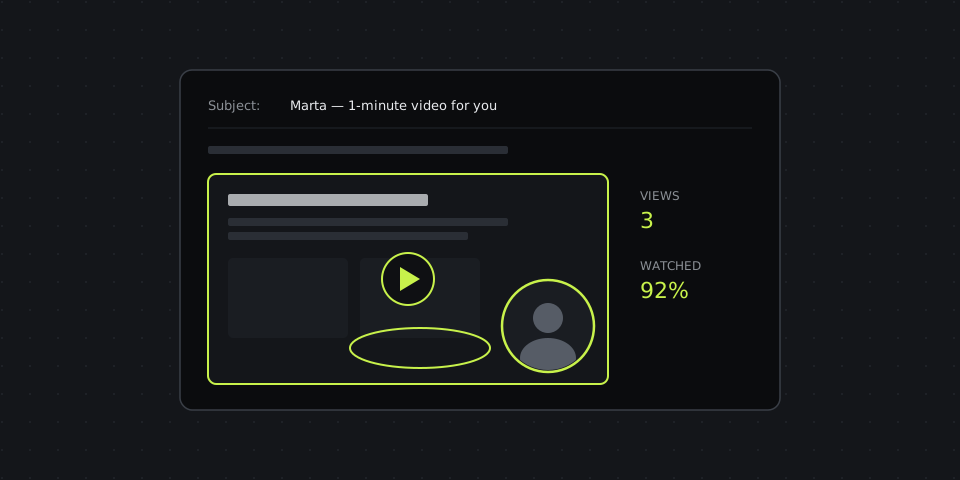
Video prospecting means sending a short, personalized video to a potential customer to start a conversation and book a meeting. The format that works best for B2B is a screen recording with your face in a corner: on screen, something about the prospect — their website, their ad, their LinkedIn post, their pricing page; in the bubble, you, talking to them directly.
It isn't a product demo, a recorded pitch deck or a generic "hi, I'm with Company X" video sent to a thousand people. The power comes from personalization the prospect can see in the first five seconds. A video that could have been sent to anyone performs like a template, just with a longer load time.
When video beats a cold email
- Warm-ish outbound. The prospect visited your site, downloaded something, engaged with a post, or fits your ideal customer profile closely enough to justify five minutes of research.
- After the first touch got no reply. A video as the second or third message stands out from the usual "just bumping this up".
- Follow-up after a demo or call. A two-minute recap of what you discussed, with their numbers on screen, which they can forward to the decision-maker who wasn't on the call.
- Proposal walkthroughs. Instead of attaching a PDF, record yourself scrolling through it and explaining the parts that matter.
- Re-engaging lost deals. "Here's what changed since we last spoke" lands better with a face.
Where video doesn't pay off: high-volume, low-value outreach where five minutes per prospect isn't worth it, and markets where buyers expect formal written proposals first.
The 60-second script
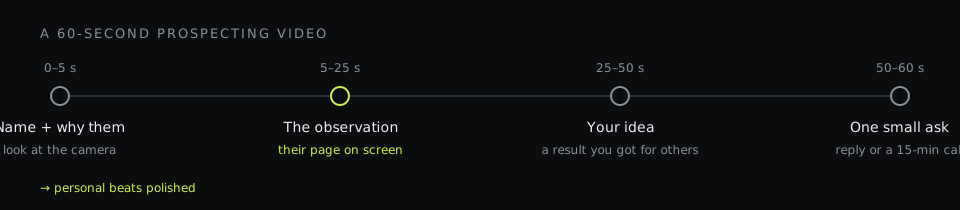
Most good prospecting videos follow the same four beats. Write them as bullet points, not a word-for-word script — reading sounds like reading.
| Time | Beat | Example |
|---|---|---|
| 0–5 s | Name and why them | "Hi Marta — I was looking at your online store this morning." |
| 5–25 s | A specific observation, on screen | "Your autumn collection page is great, but on mobile the 'Add to cart' button is below three screens of photos — here." |
| 25–50 s | The idea or result you bring | "For two other fashion stores we moved it up and tested shorter galleries — add-to-cart rate went up noticeably within a month." |
| 50–60 s | One small ask | "Worth a 15-minute call next week to show you how? Just reply to this email." |
The observation is what makes the video work. It proves you looked, it gives the prospect something useful even if they never reply, and it gives you a natural reason to talk. Keep the ask small — a reply or a short call, not a demo and a contract.
How to record it in under ten minutes
- Research (3–5 minutes). Open their website, ad or profile. Find one concrete thing — a problem, an opportunity, a recent change.
- Write four bullet points following the beats above.
- Set up the screen. Their page in the browser, scrolled to the right spot. Close other tabs and notifications.
- Turn the camera on. Bubble in the corner, face lit from the front, look at the lens when you say their name.
- Record once. If you stumble, keep going and cut it afterwards rather than re-recording five times. Perfect isn't the goal; personal is.
- Trim and send. Cut the first and last seconds of fumbling, copy the link.
Sending: subject lines, thumbnails, channels
- Mention the video in the subject. "Marta — 1-minute video about your mobile checkout" sets the expectation and gets opened more than a generic subject.
- Show a thumbnail, not just a link. A still or a short GIF of the first seconds, with their website visible, is the hook. Link the image to the video.
- Keep the email to two or three lines. The video does the talking; the text says what it's about and repeats the ask.
- LinkedIn works too. Send the link in a message; the personalized first frame does the same job as in email.
- Make it easy to watch. No sign-up, plays on a phone, loads fast. Most prospects open it between meetings.
Follow up based on what happened
The advantage of a video link over an email is that you can see what happened next:
- Watched most of it, didn't reply: they're interested but not convinced. Follow up in two or three days with one more specific idea or a case study.
- Opened but stopped early: the first ten seconds didn't land. Next time, lead with the observation faster.
- Never opened: the subject or channel didn't work; try another channel before writing them off.
- Watched several times or forwarded: it's being discussed internally. A good moment to offer a short call to the wider team.
Recording sales videos with DashShot
DashShot is our product. For prospecting, the relevant parts are:
- Talking points before you record: in the desktop app, type the topic and DashShot drafts four to seven short bullet points, shown in a small window that stays hidden from the screen recording — a teleprompter only you can see.
- Screen plus face: record a region, a window or a tab with a camera bubble and a live preview; cut out the stumbles anywhere in the video.
- A link that just plays: prospects open it in the browser on any device without an account. On Pro, you can also require an email before viewing.
- View analytics (Pro): see how many times a video was opened and the average share watched, so you know whom to follow up with.
- Screenshots as a lighter touch: a full-page screenshot of the prospect's site with two numbered callouts is a good first message when video feels like too much.
What it doesn't do: CRM integrations and sales-specific notifications that tools like Vidyard offer. If your team lives in Salesforce or HubSpot and needs views logged there, that's worth weighing. Recording is free for videos up to 5 minutes; the email gate and view analytics are on Pro, which also removes the length limit, for $8 per user per month billed annually. More on DashShot for sales teams.
Metrics worth tracking
- Open/view rate — are subject lines and thumbnails working?
- Average watch percentage — is the first 10 seconds strong enough?
- Reply rate — compare against your text-only sequences for the same segment.
- Meetings booked per 100 videos — the number that justifies the extra time per prospect.
Start with ten videos to your best-fit prospects this week, keep everything else the same, and compare reply rates against your usual emails. The numbers will tell you quickly whether video deserves a permanent place in your sequence.