Why teams start looking for a Loom alternative
Nobody switches away from a tool that works because of a single annoyance. With Loom, it's usually a combination of three things that add up once a team grows past a handful of people.
Price per seat. Loom's free Starter plan caps you at 25 videos per person and five minutes per recording. The Business plan that removes those limits is listed at $18 per user per month, and Business + AI at $24. For a ten-person team that's $2,160–2,880 a year for a screen recorder — before anyone asks whether half the seats are used more than once a week.
The free plan runs out mid-sentence. Five minutes sounds like plenty until you record a bug walkthrough or a client update and get cut off at 4:59. Teams on the free tier end up re-recording or splitting a single explanation into two links, which defeats the point of a quick async message.
The video is the end of the line. A Loom recording is a great way to explain something. It's not a great way to make sure that something gets done. The viewer watches, reacts with an emoji, maybe leaves a comment — and then somebody still has to copy the request into Jira, Asana or a chat thread so it becomes an actual task with an owner and a deadline. That extra step is where most async requests quietly die.
None of that makes Loom a bad product. It means the right alternative depends on which of those three problems you're actually trying to fix — cost, recording limits, or what happens after the video is watched.
Loom alternatives at a glance
Prices below are list prices at the time of writing (October 2026) for the cheapest paid tier, per user per month where the vendor prices per seat. Free plan limits change often, so double-check before you roll a tool out to a whole team.
| Tool | Best for | Free plan | Paid from | Platforms |
|---|---|---|---|---|
| Loom (baseline) | General async video | 25 videos, 5 min each | $18/user/mo | Mac, Windows, Chrome, mobile |
| DashShot | Recordings that become tasks | Unlimited screenshots; recording on Pro | $6/user/mo (annual) | Mac, Windows, Chrome, web |
| Tella | Polished, edited demos | Trial only | ~$13/mo (annual) | Mac, Windows, web |
| Cap | Open-source, self-hosting | Share links up to 5 min | ~$8/mo (annual) | Mac, Windows |
| Vidyard | Sales teams and CRM tracking | 5 videos/mo, up to 30 min | Paid tiers per rep | Chrome, desktop, mobile |
| Zight | Screenshots + quick clips | 25 latest captures, 5 min | ~$10/mo | Mac, Windows, Chrome |
| ScreenPal | Budget tutorials, education | Yes, with limits | ~$4/mo | Web, Mac, Windows, mobile |
| Descript | Editing by transcript | Limited free tier | ~$16/mo | Mac, Windows |
| Screenity | Free Chrome recording | Free, open-source | Optional Pro | Chrome |
| OBS Studio | Unlimited local recording | Free, open-source | — | Mac, Windows, Linux |
1. DashShot — when a recording should end in a task
Disclosure up front: this is our blog, and DashShot is our product. It's on this list because it solves the third problem above — the "now someone has to turn this video into a ticket" step — which none of the other tools here really address.
DashShot covers what you'd expect from a Loom replacement: record your full screen, a single window or a region you drag out; turn on a camera bubble that sits in the corner of the recording with a live preview before you start; pause and resume mid-recording; cut out any stretch of the video afterwards, not just the start and the end; and share a link the viewer opens in the browser without creating an account. It runs as a desktop app on macOS and Windows and as a Chrome extension, and it handles screenshots with a full annotation editor too, so one tool replaces both Loom and a separate screenshot app.
The difference is what happens to the content of the recording. Record a voice or video note explaining what needs to be done, and DashShot transcribes it and writes it up as a structured task — SMART, CLEAR or OKR, depending on how well-defined the request is — with context, expected result, owner, success criteria and deadline filled in. The recipient gets a link where they can set a status, check off subtasks and reply in a comment thread. You see every task across projects in one dashboard, with an unread marker when something changes. That's the "tasks built in" piece that Loom users usually bolt on with a separate project management tool.
A few other features overlap with Loom's paid tiers: an email gate that asks viewers to leave an email before watching, view analytics with average watch percentage, a video-to-step-by-step-documentation generator, and your own logo and colors on share pages for companies that want them.
Pricing: screenshots are free with no limits. Screen recording and voice tasks are on Pro at $6 per user per month, billed annually — about a third of Loom Business. Company plans with your own domain and branding are quoted separately.
Where it falls short: there's no free screen recording tier — if you need free video, look at Cap, Screenity or OBS below. GIF export is capped at 12 seconds. There's no Linux app, and the AI is aimed at structuring tasks, not at polishing video (no filler-word removal or auto-zoom like Tella or Descript).
Best for: agencies, product teams and managers whose videos are mostly requests — "fix this", "change that on the landing page", "here's what the client wants" — and who are tired of re-typing them into a task tracker.
2. Tella — when the video itself is the product
Tella is built for recordings people will watch more than once: product demos, course lessons, onboarding videos, launch announcements. You record in clips rather than one long take, and the editor handles the rest — layouts that switch between screen and camera, automatic zoom on clicks, trimming dead air, backgrounds and captions. The result looks like it came out of a video editor even though you never opened one.
That polish is the trade-off. Tella has no permanent free plan (there's a trial), and a quick "here's the bug" message doesn't benefit much from auto-zoom and branded layouts. Pro runs around $13 a month on annual billing.
Best for: founders, marketers and product teams recording demos and tutorials that go on a website or into a course.
3. Cap — the open-source Loom
Cap is the closest thing to "Loom, but open source." The desktop app for Mac and Windows records locally with no watermark and no time limit, and you get a shareable link the same way Loom gives you one. If you want full control over where videos live, you can connect your own storage or self-host the whole thing.
The free plan limits cloud share links to five minutes; Cap Pro (about $8 a month billed annually) removes that and adds team features. It's a younger product, so the team management, analytics and integrations are thinner than Loom's, but it moves fast.
Best for: developer-heavy teams, privacy-conscious companies and anyone who wants their recordings on their own infrastructure.
4. Vidyard — built for sales
Vidyard has been doing video for sales teams longer than Loom has existed. Its strengths are everything around the recording: who watched, how far they got, notifications the moment a prospect opens your video, and tight integrations with Salesforce, HubSpot, LinkedIn and Outlook so views show up where reps already work.
The free plan gives you five recorded videos a month at up to 30 minutes each — fewer videos than Loom's free tier, but six times the length. Paid tiers are priced per rep and climb quickly once you add the sales-team features, which is where the product earns its keep.
Best for: SDRs and account executives who use video for prospecting and follow-ups and care about view tracking more than anything else. For internal team communication it's more than you need.
5. Zight — screenshots and quick clips in one place
Zight (formerly CloudApp) sits between a screenshot tool and a Loom replacement: screenshots with annotation, GIFs, short screen recordings with a webcam, all uploaded to a link instantly. It's popular with support and customer success teams that send lots of small visual answers rather than long videos.
The free plan keeps your 25 most recent captures and limits recordings to five minutes at 720p. Paid plans start around $10 a month and add longer recordings, more storage and team features.
Best for: support teams and individuals who need a little of everything — screenshot, GIF, short video — and live in Mac or Windows.
6. ScreenPal — the budget option
ScreenPal (formerly Screencast-O-Matic) has been a staple in schools and training departments for years. It records screen and webcam, has a capable built-in editor, and adds AI transcripts, captions and chapters at a price well below the rest of this list — paid plans start at around $4 a month.
The interface feels older than Loom's and the sharing experience is less polished, but if the main requirement is "lots of people need to record tutorials and the budget is small," it's hard to beat.
Best for: teachers, trainers and teams that record lots of how-to content on a tight budget.
7. Descript — edit video by editing text
Descript turns a recording into a transcript, and you edit the video by deleting words in that transcript. Remove "um" and "you know" in one click, cut a sentence by highlighting it, fix a misspoken word with an AI voice clone. It also records screen and camera directly.
It's a full editor, so it's heavier than Loom — overkill for a two-minute update to a teammate, excellent for anything that will be published. There's a limited free tier; paid plans start at around $16 a month.
Best for: content teams, podcasters and anyone whose recordings get edited before they go out.
8. Screenity — free Loom-style recording in Chrome
Screenity is an open-source Chrome extension that records your screen, a tab or your camera, with annotation tools, a cursor highlight and a built-in editor for trimming. There's no account to create and no watermark, and recordings save locally or to Google Drive.
What you don't get is Loom's hosted sharing and team workspace out of the box — a paid Pro version adds cloud sharing for people who want it. For individuals, the free version is genuinely one of the best deals in screen recording.
Best for: individuals and small teams who want free, unlimited browser recording and are fine sharing files via Drive.
9. OBS Studio — free, unlimited, and a lot of knobs
OBS is the open-source recording and streaming software most YouTubers and streamers use. It records any combination of screens, windows, cameras and audio sources at whatever resolution your machine can handle, with no limits of any kind and no account.
It's not a Loom replacement in spirit: there's no instant link, no comments, no viewer analytics, and the first setup takes some figuring out. But if your problem is purely "we need long, high-quality recordings and we don't want to pay," OBS solves it permanently.
Best for: long-form tutorials, webinars and anyone who uploads recordings to YouTube or a course platform anyway.
How to pick the right one
Most comparisons stop at a feature table. In practice the choice comes down to one question: what happens to the recording after someone watches it?
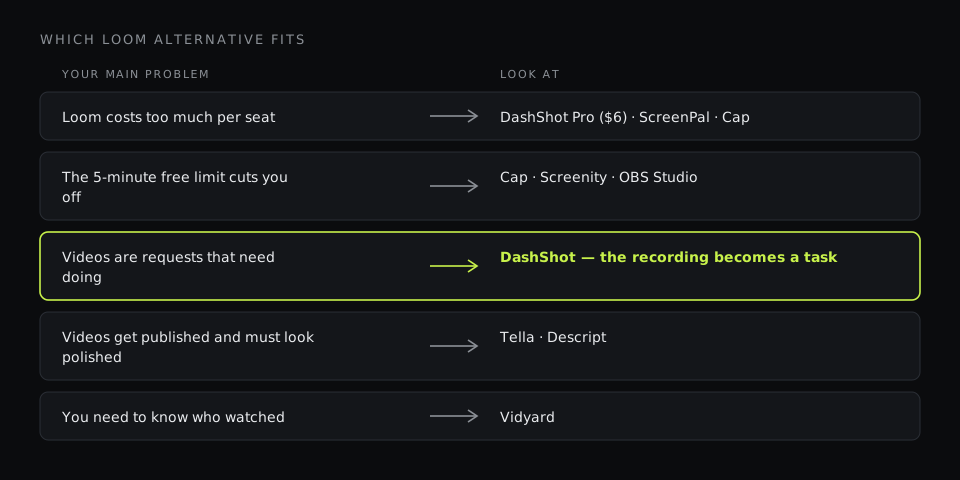
- It gets acted on — a bug gets fixed, a page gets changed, a client request gets done. You want a tool where the recording turns into a task with an owner, a status and a deadline. That's DashShot's whole reason to exist.
- It gets published — on a website, in a course, in a launch post. Pick an editor-first tool: Tella for speed and polish, Descript for heavy editing.
- It gets tracked — you need to know which prospect watched and for how long. Vidyard.
- It just needs to exist and be free — Cap for links, Screenity for Chrome, OBS for long local recordings.
- It's mostly screenshots with the occasional clip — Zight or DashShot, both handle screenshots as a first-class feature.
Then check the boring stuff that bites later: whether the person you send a link to needs an account (with DashShot, Loom, Cap and Zight they don't), whether the tool runs on every OS your team uses, and what the free plan does when you hit its limit — some tools stop recording, some delete old videos, and some just hide them behind an upgrade screen.
Switching from Loom without losing your library
Changing tools doesn't have to mean breaking every link you've ever shared. A sensible order:
- Export what matters. Download the videos that are still referenced in docs, wikis and onboarding — usually a small fraction of the library. Everything else can stay in Loom on the free plan as read-only history.
- Run both tools for two weeks. New recordings go to the new tool; old links keep working. You'll find out quickly whether the new workflow sticks.
- Replace links in long-lived docs. Onboarding pages, help-center articles and SOPs are worth updating; old Slack threads are not.
- Downgrade Loom seats, don't delete the workspace. Keeping a free workspace means old links keep playing for anyone who digs them up later.
If your team's videos are mostly requests and handoffs, the switch is also a good moment to change the habit itself: instead of "record a video, then write a ticket about it," record once and let the task come out of the recording. That's the shift that saves the most time — more than any difference in price per seat.